Choosing hosting is difficult because most plans sound capable until the website has to handle a campaign, a busy checkout, a plugin conflict, or a failed update. This complete guide to WordPress hosting explains what you are actually buying, how the main hosting models compare, and which limits matter for a business site. By the end, you should be able to shortlist a suitable plan, question a provider properly, and avoid paying for capacity or support you do not need.
Complete guide to WordPress hosting: what hosting controls
WordPress is the application used to manage pages, posts, users, themes, and plugins. Hosting is the environment that stores the application and database, processes requests, and sends each page to the visitor. A domain points people toward that environment, while a content delivery network can cache and distribute selected assets closer to the audience.
The host therefore influences server response, resource availability, software versions, backup tools, account isolation, and the controls available to developers. It does not control everything. A heavy theme, oversized images, inefficient database queries, too many tracking scripts, or a poorly built plugin can make a strong server feel slow.
This distinction matters during website development. Hosting should support the site architecture and operating model. It cannot repair weak code or remove the need for routine maintenance.
Complete guide to WordPress hosting types compared
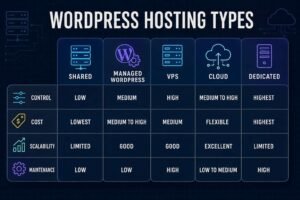
Hosting labels are not as tidy as marketing pages suggest. Shared, virtual private server, cloud, and dedicated describe infrastructure. Managed WordPress hosting describes a service layer, which may run on shared, virtual, cloud, or isolated infrastructure. Ask what sits underneath the label.
For that reason, this complete guide to WordPress hosting compares responsibility as carefully as infrastructure.
| Hosting model | Best fit | Main advantage | Main limitation | Technical responsibility |
|---|---|---|---|---|
| Shared hosting | Small brochure sites, early blogs, temporary projects | Low entry cost and simple setup | Resources and server controls are limited | Provider manages the server, site owner manages WordPress |
| Managed WordPress hosting | Business sites, marketing teams, agencies, active stores | WordPress focused tools and support | Higher cost, with possible plugin or usage restrictions | Provider handles more platform operations |
| Virtual private server | Developers, custom applications, sites needing server control | Reserved virtual resources and flexible configuration | Security and maintenance require skill unless management is included | Owner or retained administrator manages the stack |
| Cloud hosting | Growing sites, variable demand, regional or resilient setups | Flexible resource allocation and several deployment patterns | Pricing and architecture can become difficult to compare | Depends on whether the service is managed |
| Dedicated hosting | Large or specialised workloads with strict isolation needs | Full physical server resources and control | Cost, administration, and capacity planning | Usually requires experienced operations support |
Shared hosting
Shared hosting places many accounts on the same server. It is a sensible choice when traffic is modest, the site is mostly cached, and downtime would not interrupt important transactions. The risk is not simply that other sites exist on the machine. The real issue is how the provider limits CPU time, memory, database activity, file operations, and simultaneous processes.
A small professional site can run well on a disciplined shared platform. A membership portal, busy WooCommerce store, or campaign landing page with sudden demand is harder to predict. This complete guide to WordPress hosting treats shared hosting as a valid business option when the operational risk is genuinely low.
Managed WordPress hosting
Managed plans often include staging, backups, caching, security monitoring, controlled updates, and WordPress support. They can justify the price when no one inside the business wants to manage servers.
Managed does not always mean that the provider will troubleshoot custom code, repair a plugin conflict, restore content on request, or optimize every page. Read the support boundary. One provider may manage only infrastructure, while another will investigate WordPress application problems.
Virtual private servers
A virtual private server gives the account an isolated operating environment with defined resources. It can be configured around unusual software, deployment tools, background jobs, or security rules. That flexibility is valuable to an experienced developer and dangerous to a team with no server administrator.
An unmanaged virtual private server is not automatically better than managed WordPress hosting. If updates, monitoring, firewall rules, logs, backups, and recovery are neglected, extra control becomes extra risk.
Cloud hosting
Cloud hosting may refer to one virtual machine, a managed platform, or a distributed system. Ask what can scale, which components are redundant, what happens during a regional failure, and whether scaling can change the bill without approval.
For many WordPress solutions for businesses, a managed cloud platform offers a useful balance. It provides operational help without forcing the client to design an infrastructure system from scratch.
Dedicated hosting
A dedicated server belongs to one customer, but exclusivity does not guarantee reliability. It still needs monitoring, updates, backup, and recovery planning. Choose it when isolation or a specialised workload justifies the administration.
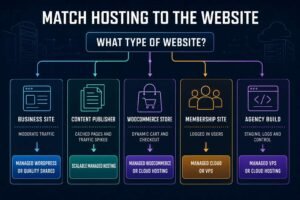
Match hosting to the website, not the sales tier
A complete guide to WordPress hosting must account for the work each request creates, not only traffic totals. Ten thousand cached article views can be easier to serve than a smaller number of logged in users searching records, managing accounts, or placing orders.
Business and lead generation websites
A typical service business needs reliable managed hosting or a well run shared plan, daily backups, staging, HTTPS, dependable support, and enough resources for forms, analytics, and occasional campaigns. The best value is usually a plan the marketing team can operate without waiting for a developer for routine tasks.
Pixels Crab approaches business website development around design, performance, maintainability, and the platform the client can realistically manage. Hosting belongs in that decision from the start, not after the site is built.
Content publishers
Publishing sites benefit greatly from full page caching and a content delivery network. Their main risks are sudden audience spikes, large media libraries, search traffic volatility, and editorial activity. Ask how traffic overages work and how quickly the plan can be expanded.
WooCommerce stores
Stores have more dynamic work. Cart, checkout, account, search, inventory, scheduled actions, payment callbacks, and integrations cannot all be treated as ordinary cached pages. A small catalogue with light sales may perform well on entry managed hosting, while a promotion driven store needs stronger database performance, object caching, worker capacity, monitoring, and rapid support.
WooCommerce currently recommends WordPress 6.9 or later, PHP 8.3 or later, MySQL 8.0 or MariaDB 10.6 or later, HTTPS, and a WordPress memory limit of at least 256 MB. Check the current WooCommerce server recommendations before publication or migration because these requirements change.
Membership, learning, and community sites
Logged in experiences bypass much of the page cache. Database queries, personalised dashboards, video delivery, search, messaging, and scheduled jobs can place steady pressure on the server. Test with realistic concurrent users rather than judging the plan by monthly visits.
Agencies and development teams
Developers should value staging, secure shell access, WP CLI, separate environments, logs, rollback options, and permission controls. Client sites must not become trapped inside one employee account or an arrangement that cannot be transferred.
Complete guide to WordPress hosting technical requirements
Every complete guide to WordPress hosting needs a date check because platform requirements change. WordPress recommends PHP 8.3 or later, MariaDB 10.11 or MySQL 8.0 or later, and HTTPS. Apache or Nginx is recommended, although WordPress can run on other servers that support PHP and a compatible database. The official WordPress hosting requirements should be checked again before the article is published because supported versions can move.
Do not confuse a minimum that still runs with a sensible production baseline. Older software can remain technically compatible after its security support has ended. The official PHP support calendar shows which branches receive active or security support.
Also confirm memory limits, upload limits, execution time, file limits, scheduled task behaviour, outgoing email policy, and required PHP extensions. A plan can meet the basic WordPress specification yet fail a large import, backup, image process, or plugin task.
Complete guide to WordPress hosting performance and website optimization
Performance starts with measurement. Test the home page, a heavy landing page, search, a logged in screen, and checkout where relevant. Measure before and after migration, then under load. One home page score does not describe the whole site.
The WordPress official optimization guidance identifies hosting, configuration, software versions, images, caching, compression, database tuning, and content offloading as connected factors. Good hosting creates headroom, while careful website optimization decides how efficiently that headroom is used.
Caching and dynamic requests
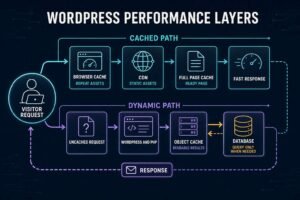
Full page caching can serve a prepared page without rebuilding it for every visitor. Object caching stores reusable database results. Browser caching reduces repeat downloads, and a content delivery network can serve static assets from locations closer to users. These layers solve different problems and should not be treated as interchangeable.
Ask which cache is included, who configures it, how it is purged after updates, and which pages are excluded. For stores and membership sites, verify that carts, accounts, sessions, and personalised content are handled correctly.
Core Web Vitals and server response
Google describes Core Web Vitals as real user measures of loading performance, interactivity, and visual stability. Good results support user experience and can contribute to search performance, but they do not guarantee rankings. Review the Google guidance on Core Web Vitals before setting targets.
Hosting most directly affects the early server response and the consistency of backend work. Largest Contentful Paint may still be poor because of an oversized hero image. Interaction to Next Paint may suffer because of JavaScript. Cumulative Layout Shift is usually a layout issue. Do not buy a larger server before locating the delay.
Security, backups, and updates
A complete guide to WordPress hosting should draw a clear line between provider and owner responsibilities. The host protects infrastructure and account boundaries, while the site owner controls users, passwords, plugins, themes, application updates, integrations, and content workflows. The WordPress hardening handbook frames security as risk reduction and recovery planning, not a promise that incidents are impossible.
Ask about account isolation, firewall coverage, malware detection, software patching, access logs, multifactor authentication, secure file transfer, and incident response. Then ask what is excluded. A scan that reports malware is different from a service that removes it and verifies the site afterward.
Backups need equal scrutiny. WordPress explains that a restorable site normally requires both files and the database. Its backup guidance also recommends a schedule based on publishing activity and backups before upgrades.
For a business site, confirm frequency, retention, storage location, restoration method, and whether a restore has been tested. A daily backup is not enough if it is stored only on the same account, retained for one day, or impossible to restore without a support ticket.
How WordPress hosting affects SEO
Hosting does not make weak content rank. It can, however, support the technical conditions needed for crawling and a usable visitor experience. Repeated server errors, long response times, broken HTTPS, accidental blocking, and failed migrations can all undermine SEO work.
Google recommends good Core Web Vitals but states that good scores alone do not guarantee top results. Hosting should therefore be assessed as part of technical SEO, alongside crawlability, internal linking, content quality, structured data, mobile usability, and page design.
A content delivery network and sensible data centre choice can improve latency. They are not shortcuts to local rankings. Pixels Crab offers SEO services that connect technical health with content and search goals.
Complete guide to WordPress hosting costs and contract terms
Introductory prices make poor comparisons. Calculate the likely cost across the first useful contract period, including renewal, taxes, traffic or visitor overages, backup retention, staging, email, security tools, migration, support level, and the number of sites allowed.
Resource definitions deserve attention. One provider limits visits, another bandwidth, another CPU time, and another concurrent workers. These figures are not directly comparable. Ask what happens at the limit, whether the site slows, charges increase, or service is suspended.
Support also has economic value. A cheaper plan may be expensive if a developer must diagnose every server issue. A premium plan may be wasteful if the team already manages infrastructure confidently. This complete guide to WordPress hosting recommends pricing the operating model, not just the server space.
Practical WordPress tips for a hosting shortlist
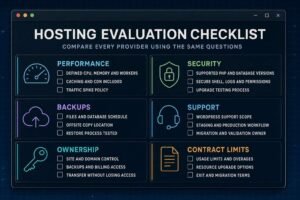
Use the same questions for every provider so the answers can be compared properly.
- Which infrastructure runs this plan, and are CPU, memory, storage, workers, or database resources defined?
- Which WordPress tasks does support handle, and which are outside scope?
- How often are files and databases backed up, where are copies stored, and how is a restore performed?
- Is staging included, and can changes move safely between staging and production?
- Which PHP and database versions are available, and how are upgrades tested?
- Which cache layers and content delivery services are included?
- What happens during a traffic spike or when a usage limit is reached?
- Can the account provide logs, secure shell access, WP CLI, and separate user permissions where needed?
- How does migration work, and who is responsible for validation?
- Can the site, domain, backups, and billing ownership be transferred without losing access?
Common hosting mistakes
Buying the longest term before testing
A low introductory rate can encourage a long commitment before support, performance, and control panel quality are known. Test a monthly term or use a clear refund period where practical. Verify the current policy before purchase.
Choosing by storage alone
Most business sites do not struggle because they lack disk space. Database activity, CPU limits, memory, worker capacity, cache behaviour, and slow code are more likely constraints. Large media libraries may be better served by image optimization or external storage.
Assuming managed means fully maintained
Managed hosting can include server work without covering plugin updates, content errors, custom code, or security cleanup. Create a responsibility list with the provider, developer, and business owner named beside each task.
Trusting backups without a restore test
A backup is only useful when the correct version can be restored within an acceptable time. Test the process on staging and record who can start it during an incident.
Ignoring dynamic workloads
Monthly visitor counts hide the work created by search, checkout, memberships, imports, scheduled actions, and integrations. Load test the journeys that create revenue or operational risk.
Giving the provider permanent ownership
The business should control the domain, hosting account, billing access, recovery email, and independent backup copy. Developers and agencies can receive appropriate permissions without becoming the only route into the system.
Plan a WordPress migration without avoidable damage
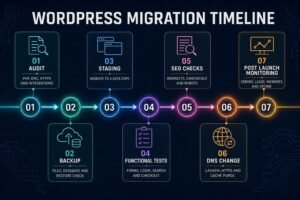
A complete guide to WordPress hosting must include the move between providers. A migration is a technical change and an SEO event. The safest process uses a complete backup, a staging copy, a written validation list, and a rollback point.
- Record the current PHP version, DNS, HTTPS setup, redirects, scheduled tasks, email routing, cache rules, analytics, and important integrations.
- Create matching file and database backups, then confirm they can be opened and restored.
- Migrate to staging and test forms, search, login, checkout, transactional email, mobile layouts, structured data, and key page templates.
- Crawl the old and new versions to compare status codes, canonical tags, robots rules, internal links, and indexable URLs.
- Schedule the change during a lower risk period, update DNS, issue HTTPS certificates, purge caches, and keep the previous environment available for rollback.
- Monitor server errors, uptime, analytics, Search Console, payment events, leads, and customer reports after launch.
If the store is commercially important, coordinate hosting with ongoing ecommerce management so inventory, payments, campaigns, and technical monitoring are checked together.
Conclusion
The right hosting plan is the least complicated option that meets the website’s real performance, security, recovery, and support needs. Shared hosting can suit a small, low risk site. Managed WordPress hosting is often the practical choice for a business that values support and predictable operations. A virtual private server, cloud setup, or dedicated server becomes sensible when control, workload, or resilience justifies the extra administration.
Use this complete guide to WordPress hosting as a shortlist framework, then verify current software requirements, contract terms, and support boundaries directly with each provider. Choose for the next credible stage of the site, not an imagined scale that may never arrive.
Plan your Shopify store project? Contact Us
Complete guide to WordPress hosting frequently asked questions
What is WordPress hosting?
WordPress hosting is a server environment used to store and run a WordPress website. Some plans simply support WordPress, while managed plans add WordPress focused caching, backups, staging, updates, security tools, and specialist support.
Is managed WordPress hosting worth the cost?
It is often worth the cost when the site produces leads or sales and the business has no server administrator. It may offer less value to a developer who already manages infrastructure or to a small site with limited risk and simple requirements.
How much hosting does a small business website need?
There is no reliable answer based only on visitor numbers. A mostly cached brochure site may need modest resources, while a smaller membership or store site can create heavier database and application work. Measure the important page types and ask the provider how its limits are enforced.
Does WordPress hosting improve SEO?
Hosting can support SEO through stable availability, faster responses, HTTPS, and fewer server errors. It cannot replace useful content, crawlable architecture, internal links, or careful on page work. This complete guide to WordPress hosting treats hosting as one part of website optimization.
Do I need a content delivery network?
A content delivery network is helpful when visitors are spread across regions or the site serves many static assets. A local business with a compact site and audience near the server may see less benefit. Test before and after enabling it.
Can I change WordPress hosts later?
Yes. WordPress files and the database can be moved, but the migration must also preserve DNS, HTTPS, email, redirects, scheduled tasks, analytics, and application behaviour. Keep an independent backup and a rollback route until the new environment is stable.
What should I verify before buying hosting?
Confirm current software versions, resource limits, backup and restore terms, support scope, staging, caching, security controls, migration assistance, renewal costs, ownership, and cancellation rules. Provider features and policies can change, so review the current contract before purchase.